Documentation
AI estimates and costs
Our AI agent provides you with an estimate for using any AI provider/model on a task before spending any money.
To understand how estimates and costs can vary by AI provider/model, it's essential to talk about some technical basics about AI models.
- AI models use tokens to measure their work. Tokens are generally smaller than a word, often the size of a syllable, but can also be a single character. Yes, it can get complicated.
- AI models charge tokens for both input (i.e. the prompt you give it) and output (i.e. the response they give you). In addition, input and output tokens have different costs, not to mention tokens for recently released AI models can be 5 or 10 times more expensive than older AI models.
- All AI models tokenize content differently, even if you use the same provider. So while one model could quantify a prompt and response as 3000 tokens, another model could just easily quantify an identical prompt and response as 3500 tokens or 2700 tokens.
Given all the potential variations between tokens associated with providers/models, the Mini Agent AI estimator attempts to use all publicly available information, on costs and tokens, to give you an estimation as close as possible to the actual cost of running an AI provider/model on your task.
AI agent settings you control that influence cost
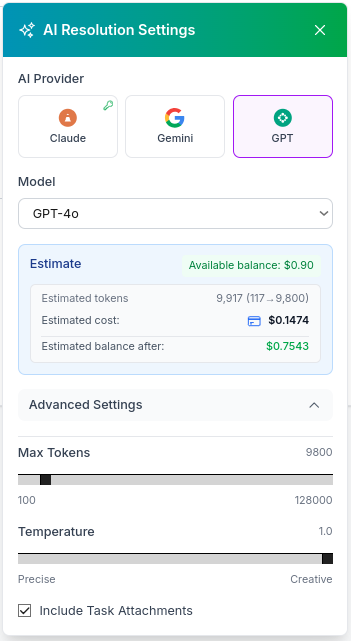
Before triggering the AI agent to work on your task, you can adjust AI provider/model parameters in the 'AI Resolution Settings' window by clicking on the gear icon besides the 'Generate AI Resolution' button.
You can see the 'AI Resolution Settings' window pictured here. The most critical factors that influence cost by order of importance are:
- AI provider/model: Newer and specialized models always cost more per token. If your task only requires basic knowledge, old and inexpensive models can produce results as good as newer and more expensive models.
- AI model max tokens: You can tell the AI agent to limit a model's response to a set amount of tokens. Setting max tokens doesn't necessarily mean all these tokens will be consumed/charged for a response, since a model might very well respond with half or less tokens. However, considering some models can be very chatty, keeping this maxiumum amount of tokens in check, ensures shorter responses that translate into lower costs.
- AI prompt size: The AI agent always uses a task's title and description to generate a prompt, as well as any file attachments associated with the task. You can reduce token consumption by optimizing both a task's title and description, as well as disabling file attachments in the bottom checkbox, so they're ignored for prompt generation.
Other docs that touch the same themes and keywords.